メニューバー - Settings
File メニューの Settings では、MA 3D の外観や動作の基本的な設定を行います。
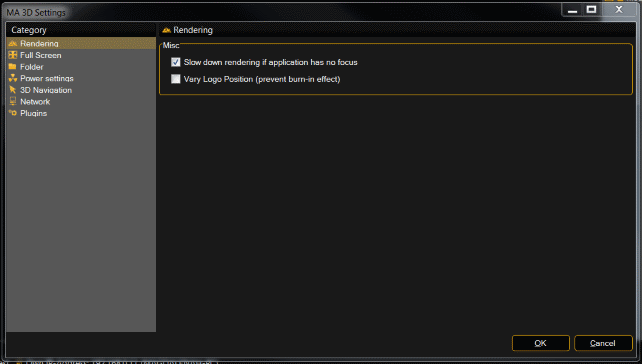
この設定は、ショーファイルとは独立していて、プログラム終了後も保持されます。
初めてインストールした場合、概要を確認し、設定を行ってください。
| Category | 設定グループ | 機能 |
|---|---|---|
| Rendering | Misc | ・Slow down rendering if application has no focus アプリケーションにフォーカスが無い場合、レンダリングを遅くする |
| ・Vary Logo Position (prevent burn-in effect) ロゴ表示位置の変更(焼き付き防止) |
||
| Full Screen | Screen Alignment | ・This screen layout is part of a bigger screen layout of further machines. この画面レイアウトは、追加マシンのより大きな画面レイアウトの一部 |
| 画面の識別 | ||
| Folder | Media フォルダの選択 | |
| Power Settings | Windows Mode | ・Disable Screensaver |
| Disable Standby | ||
| Fullscreen Mode | ・Disable Screensaver (全画面モードの場合のみ) | |
| ・Disable Standby (全画面モードの場合のみ) | ||
| All Modes | ・Allow machine shut down via "shutdown" command "shutdown" コマンドによるすべてのマシンのシャットダウン |
|
| 3D Navigation | Mouse | ・Reverse Orbit |
| ・Reverse Zoom | ||
| ・Mouse Speed | ||
| 3D Input Devices | ・Move Speed | |
| ・Rotate Speed | ||
| Network | ・MA-Net IP-Address MA ネットワークに対するIPアドレスの設定 |
|
| Plugins | プラグインの有効化 |