Timing マスター
|
grandMA3 ユーザマニュアル » マスター » Timing マスター
|
Version 2.4 |
Timing マスターは50種類あります。
値は、0秒~10秒の範囲で指定できます。
Timing マスターは、数値の代わりに再生タイミングを設定できます。 また、再生コマンドと組み合わせてタイミングを設定することもできます。
Timing マスターには、以下のプロパティを設定できます。
- シーケンス内のタイミング: CueIn Fade、CueOut Fade、CueIn Delay、CueOut Delay、Feature Group Fade、および Feature Group Delay
シーケンスでの Timing マスターの使用については、キュー・タイミング - Timing マスター を参照してください。 - Preferences and Timings の Playback Timing:
これらのデフォルト Playback Timing を表示・編集するには、Menu - Preferences and Timings - Timings に移動します。
デフォルト Playback Timing については、キュー・タイミング - Playback Timing を参照してください。
Timing マスターを設定するには、これらのプロパティのいずれかの値を編集し、電卓 で Timing マスターを選択してください。
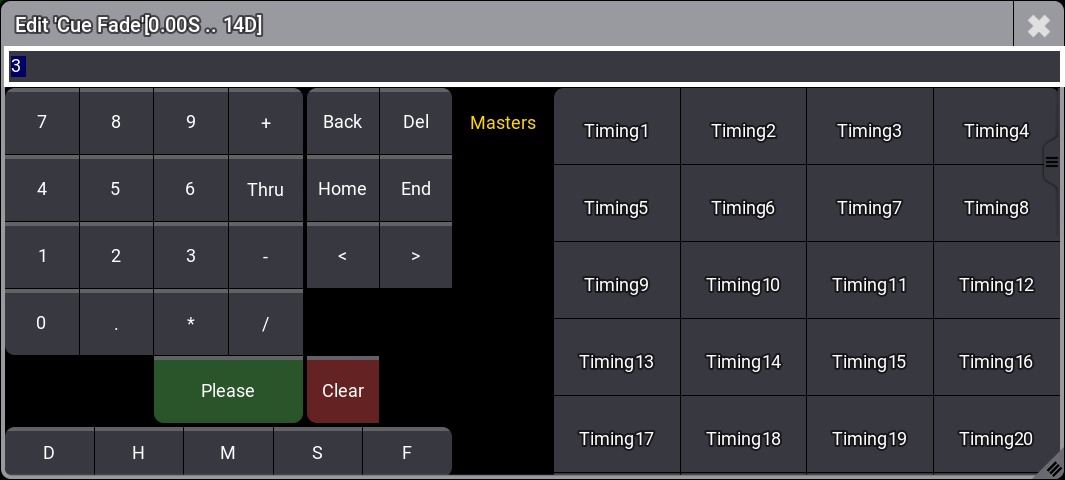
Sequence Sheet で Condensed Timing が有効になっている場合、インとアウトのタイミングに異なる Timing マスターを設定するには、Cue Fade または Cue Delay 電卓に手動で入力します。
例: Timing1/Timing2 (名前と番号の間に空白を入れないでください)。
Timing マスターを 再生コマンド と組み合わせて使用するには、数値の代わりに Timing マスターを入力します。
例:

|
User name[Fixture]>Goto Cue 5 Fade "Timing5" |
Timing マスターはエクゼキュータに割り当てられます。マスターをエクゼキュータに割り当てる方法については、エクゼキュータへのオブジェクト割り当て を参照してください。
Timing マスターの名前を変更したり、スクリブル、アピアランス、ノート、またはタグを追加したりするには、Assign メニュー の Edit Setting タブに移動するか、Label キーワード を使用します。