タグ
|
grandMA3 ユーザマニュアル » タグ |
Version 2.4 |
タグ(Tag)を用いると、ソフトウェア全体でオブジェクトを整理、リンク、相互参照できます。また、ライブ的なショーにも最適なツールです。同じタグを持つすべてのオブジェクトを、まとめてトリガーしたり選択したりできます。
タグは、Tags プールにまとめられています。これは、Add Window ポップアップの Pools タブで開けます。

プールの設定にアクセスするには、プールの左上隅にある MA をタップします。
タグの割り当て
タグは、シーケンスやグループなどの他のオブジェクトに割り当てることができます。また、タグを別のタグに割り当てることも可能です。
同じオブジェクトに複数のタグを割り当てられます。
オブジェクトにタグを割り当てる方法は複数あります。
- Tags プール・オブジェクト
- Edit を押して、Tags プールのオブジェクトをタップします。Tag Editor が開きます。
- Add New Tag Reference をタップします。ポップアップが開きます。
- オブジェクトを選択します。
- Assign をタップします。
- プール・オブジェクト
- プール・オブジェクトの Swipey コマンド を開き、Edit または Edit Setting を選択します。ポップアップが開きます。
一部のプール・オブジェクト(Sequence や Macro など)では、さらにポップアップのタイトルバーで Settings をタップします。 - Tags をタップすると Edit Tags ポップアップが開きます。
- タグを選択し、Assign をタップしてください。
- 他のオブジェクト
これは、例えばレシピ、キュー、またはマクロ行に適用されます。
- Tags 列のセルを編集します。Edit Tags ポップアップが開きます。
- タグを選択して、Assign をタップします。
- コマンドライン
コマンドラインを用いてタグを割り当てる方法については、Tag キーワード を参照してください。
すでに割り当てられているタグは、上に挙げられた方法で割り当てを解除することもできます。
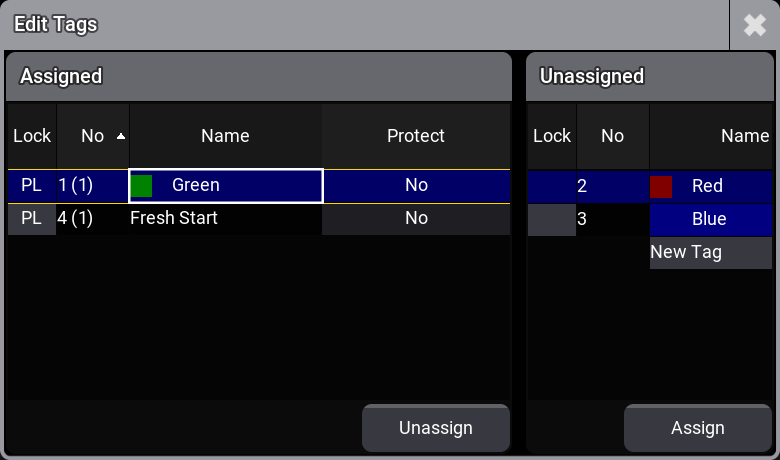
Edit Tags ポップアップの左側には、対応するプール・オブジェクトに割り当てられているタグが表示されます。右側には、割り当てられていないタグが表示されます。
このポップアップでは、タグのロック/解除したり、Kill Instant および Kill Delayed に対する保護も設定できます(後述 を参照)。
タグがプール・オブジェクトに割り当てられると、プール・オブジェクトに  が表示されます。割り当てられたタグの名前と番号は、プール・オブジェクト設定の Tags に表示されます。

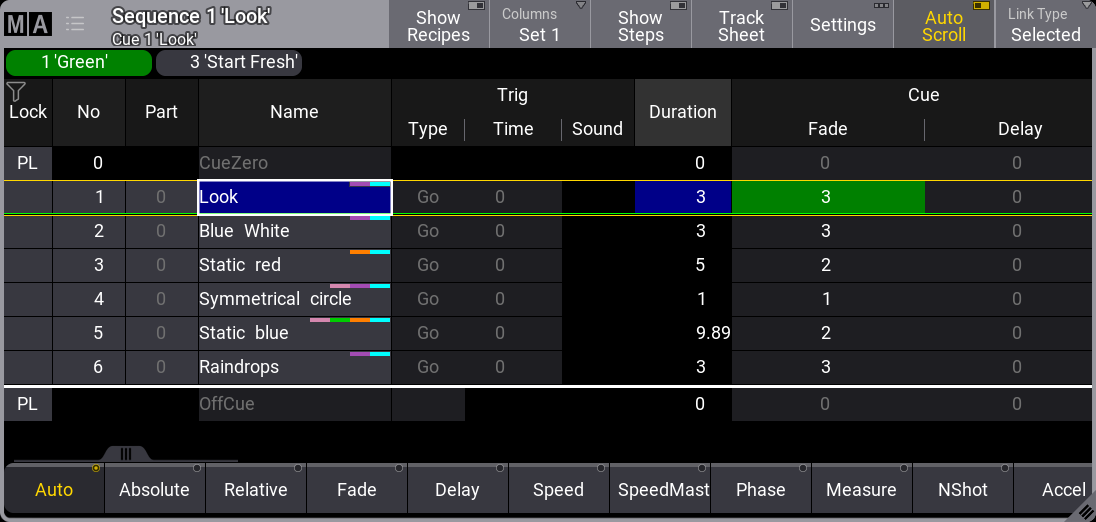
Sequence Sheet、および Sequence Editor や Macro Editor などでは、割り当てられたタグがタイトルバーとグリッドの間の領域に表示されます。Tags プール内のオブジェクトと同様に、タグを編集したり、プール・アクションを実行したりできます。タグに割り当てられたアピアランスの背景色は、エディタに表示されるタグの背景色を指定します。
タグの編集
タグを編集するには、Edit を押し、Tags プール内のオブジェクトをタップします。
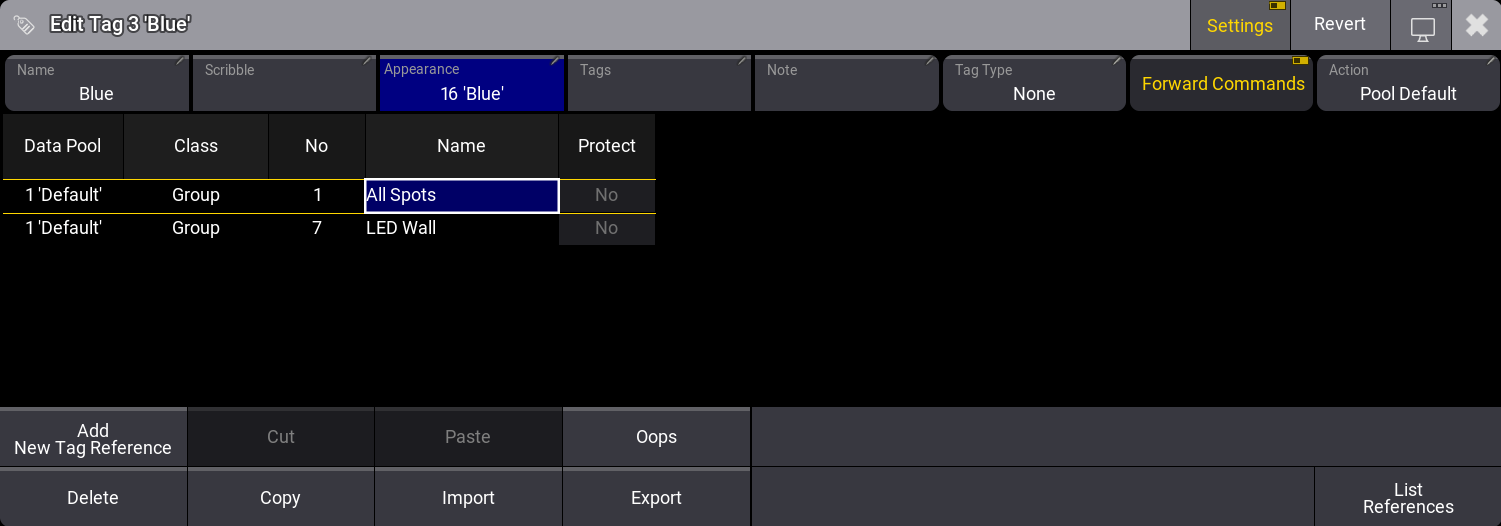
Tag Editor には、そのタグが割り当てられているオブジェクトと、以下の情報が表示されます。
- Datapool: 対応するデータプールです。
- Class: 割り当てられた参照のオブジェクト・タイプです。
- No: 対応するプール・オブジェクトの番号です。
- Name: プール・オブジェクトの名前です。
- Protect: Yes に設定すると、Kill Instant と Kill Delayed は割り当てられた参照に影響しません。デフォルトは No です。
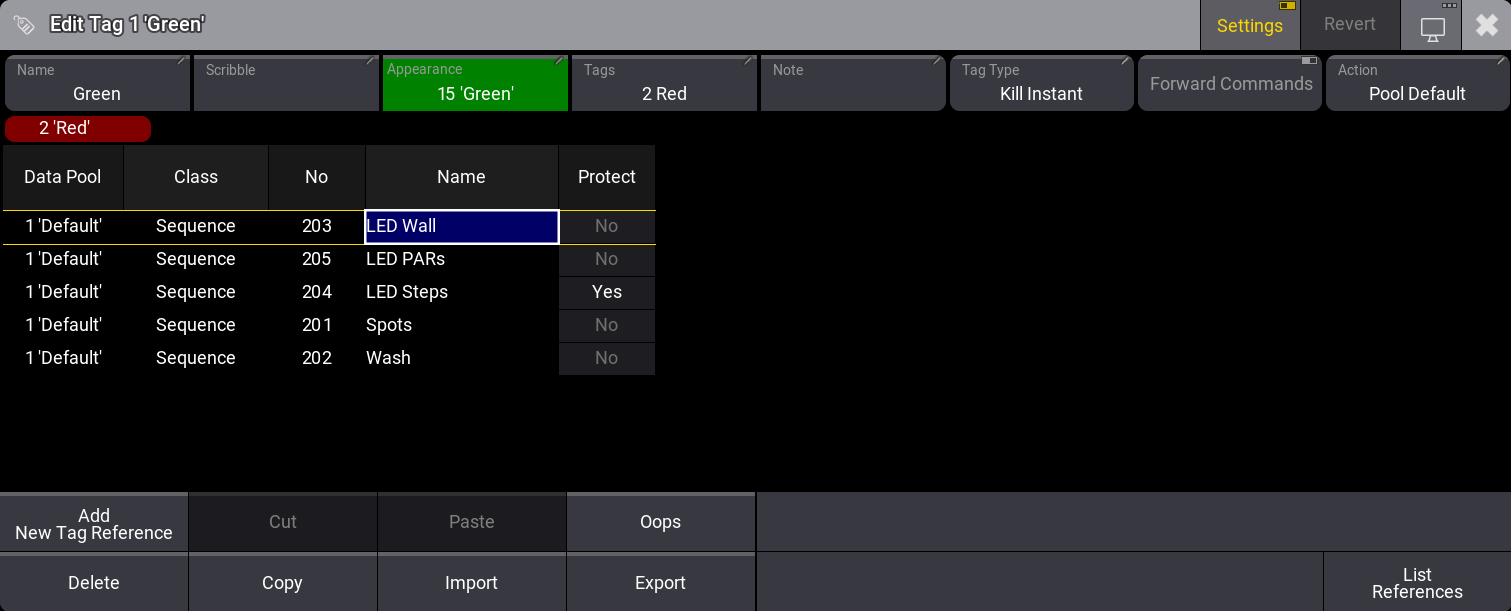
Tag Editor の Add New Tag Reference を用いると、複数のオブジェクトを同時に1つのタグへ割り当てることができます。Add Tag References ポップアップでは、複数のオブジェクトを選択して順に割り当てることができます。その場合、オブジェクト行を選択して Assign をタップします。
Tag Editor のタイトルバーで Settings を有効にすると、Name、Scribble、Appearance、Tags、Note、Tag Type、Action を設定でき、Forward Commands のオン/オフを切り替えられます。プール・オブジェクトに対して選択できるアクションは、プールの場合と同じです。
以下のタグタイプを使用できます。
- Kill Instant: 同じタグを使用する他の再生は、シーケンスを開始するとすぐに OffCue を開始します。
- Kill Delayed: 開始されたシーケンスが最初にフェードインを完了し、次に同じタグを使用する他の再生が OffCue を開始します。
タグタイプを機能させるには、シーケンスをトリガーする前にタグとタグタイプを設定しておく必要があります。設定していない場合、対応するシーケンスが一度トリガーされて初めて、タグタイプが機能します。
タグによってプレイバックが開始されると、Off Menu および Running Playbacks ウィンドウの Trigger 列に、そのタグが表示されます。

|
ヒント |
| Kill Protect は、タグから実行される Kill Instant や Kill Delayed によってシーケンスが無効化されることからシーケンスを保護するものではありません。Kill Protect については、Sequence Settings および Kill キーワード を参照してください。 |
|
|
ヒント |
| 一時的な再生アクション(Flash、Temp、Swap、および Black)の場合、Kill Instand および Kill Delayed は他の再生を恒久的にオフにしません。 |
Forward Commands がオンに切り替わっている場合、タグのすべての参照に対して 再生コマンド を同時に実行できます。これはデフォルトで有効です。
これは >>>、<<<、Go+、Go-、Goto、Halfspeed、Load、On、Off、Pause、Rate1、Speed1、Toggle、Top に適用されます。
例1 - Kill Instant と Kill Delayed の適用
必要条件:
- いくつかのライトがパッチされたショー(例: デモショー)を用意します。
- タグの効果をより明確に確認するには、3D Viewer を開いておくことをお勧めします。
同じキューで、フィクスチャ9、11、13に対して、シーケンス2、3、4 を個別に作成します。
- Dimmer 100%
- Fade 2秒
タグ1を設定には、以下のようにします。
- タグ1を編集します。
- Edit を押します。
- Tags プールにある最初のプール・オブジェクトをタップします。
- タグ参照を追加します。
- Add New Tag Reference をタップします。
- シーケンス2~4を選択します。
- Assign をタップします。
- エディタのタイトルバーにある Settings をタップします。
- Tag Type を Kill Instant に指定します。
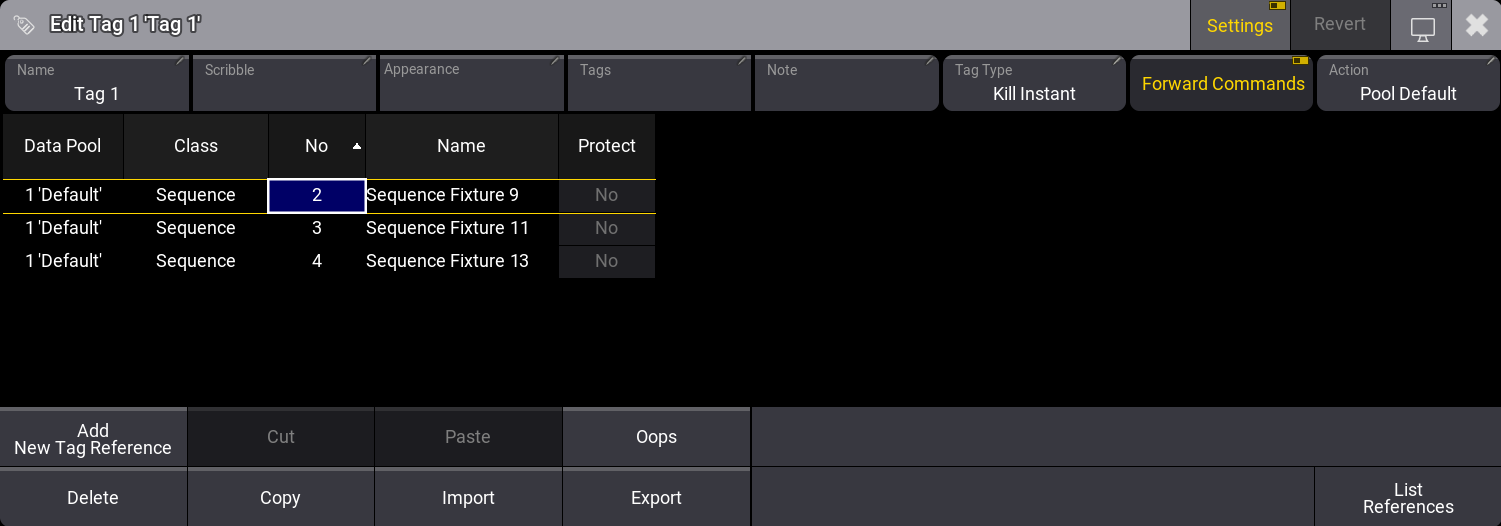
タグ1が割り当てられているいずれかのシーケンスをトリガーします。
結果: タグ1が割り当てられている他のシーケンスは直ちに無効になります。
タグ1を編集し、Tag Type を Kill Delayed に変更します。
結果: 他のシーケンスは、トリガーされたシーケンスのフェードイン完了後に無効になります。
以下の動画で、Kill Instant と Kill Delayed のタグタイプの効果を確認してください。
タグ1を編集し、シーケンス3の Protect を Yes に設定します。
結果:
- シーケンス2をトリガーすると、シーケンス4は無効になりますが、シーケンス3は無効になりません。
- シーケンス3は、シーケンス2とシーケンス4を無効にします。
以下の動画で、シーケンスに Protect が適用されている様子を見てください。
例2 - Forward Commands の適用
必要条件:
- いくつかのライトがパッチされたショー(例: デモショー)を用意します。
- タグの効果をより明確に確認するには、3D Viewer を開いておくことをお勧めします。
スポット全体やLEDウォールなど、異なるフィクスチャのグループで2つ以上のシーケンスを作成します。
- Dimmer 100%
- Color blue
"Blue" タグを設定します。
- Edit を押します。
- Tags プール内のオブジェクトをタップします。
- タグの参照を追加するには、以下のようにします。
- Add New Tag Reference タップします。
- 作成したシーケンスを選択します。
- Assign タップします。
- エディタのタイトルバーにある Settings をタップします。
- Name を "Blue" に設定します。
- Appearance を青に設定します。
- Forward Commands が無効になっている場合は、それを有効にしてください。
Go+ を押し、Blue タグをタップします。
結果: Blue タグが割り当てられているすべてのシーケンスに対して Go+ が実行されます。