グループ・マスター
| grandMA3 ユーザマニュアル » グループ » グループ・マスター | Version 2.4 |
グループは、グループ内のフィクスチャに対するマスターとなることができます。詳しくは マスター を参照してください。
グループをエクゼキュータに割り当てると、マスターレベルを調整しやすくなります。方法については、エクゼキュータへのオブジェクト割り当て を参照してください。
グループ・マスターには以下の4種類があります。
- Positive - HTP グループ・マスターです。プール・オブジェクトの右上隅に
 アイコンが表示されます。グループのマスターの値に応じて、フィクスチャ出力が下がります。
 - Negative - LoTP グループ・マスターです。プール・オブジェクトの右上隅に
 アイコンが表示されます。グループのマスターの値に応じて、フィクスチャ出力が下がります。
 - Scaling - インテンシティ出力をスケーリングします。プール・オブジェクトの右上隅に
 アイコンが表示されます。例えば、フィクスチャが50%でグループ・マスターが50%の場合、出力は25%になります。
 - Additive - 出力を制限せずに、プログラマとプレイバックからの値のHTPマージとして出力を追加します。プール・オブジェクトの右上隅に小さな
 アイコンが表示されます。
Positive、Negative、および Scaling の違い
Positive マスターと Negative マスターの違いは、複数のグループに同一または重複するフィクスチャが含まれる場合に関係します。
Negative マスターは Positive マスターより優先されます。
例えば、2つのグループに出力100%のフィクスチャが含まれていて、一方のグループが80%の Positive マスターで、もう一方のグループが60%の Negative マスターだった場合、出力は60%になります(Negative マスターによって制限)。Negative マスターを上げると、Positive マスターが有効になって、出力が80%で止まります。また、両方のグループを Scaling に切り替えると、100%のフィクスチャ出力に、60%ともう一方のグループ・マスターの80%が乗算されて、出力は48%になります。
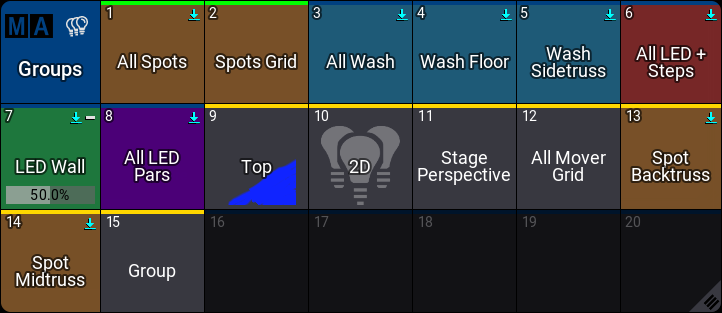
モードが割り当てられているグループには、関連性がある場合、マスターレベルを表示する水平バーがあります。
マスターモードは、Edit Group ポップアップで選択できます。詳しくは グループの編集 を参照してください。
モードは、Set キーワード によって割り当てることも可能です。
例
コマンドラインから、グループ4のマスターモードを Positive に設定します。

|
User name[Fixture]>Set Group 4 Property "Mode" "Positive" |
モードの名前では大文字と小文字が区別されます。"positive" ではなく "Positive" と入力しないと機能しません。

|
ヒント |
| モードを指定しなかった場合、ポップアップが表示され、リストからモードを選択できます。 |
グループ・マスターの削除
グループを消さずに、それをエクゼキュータから削除できます。
Group プールでグループを削除すると、ショーから無くなります。
|
|
ヒント |
| エクゼキュータからグループを削除しても、それはプール内に残るため、フィクスチャの制限は維持されます。グループを直接削除すると、フィクスチャはグループ・マスターの制限値から元の値に戻ります。 |